

Changing the VPS Plan
If you need more resources (CPU, RAM, or disk), you can upgrade your plan in just a few steps.
Step 1. Select the server
Section titled “Step 1. Select the server”Open: Virtual Dedicated Servers
Select the required server and click: Change Plan

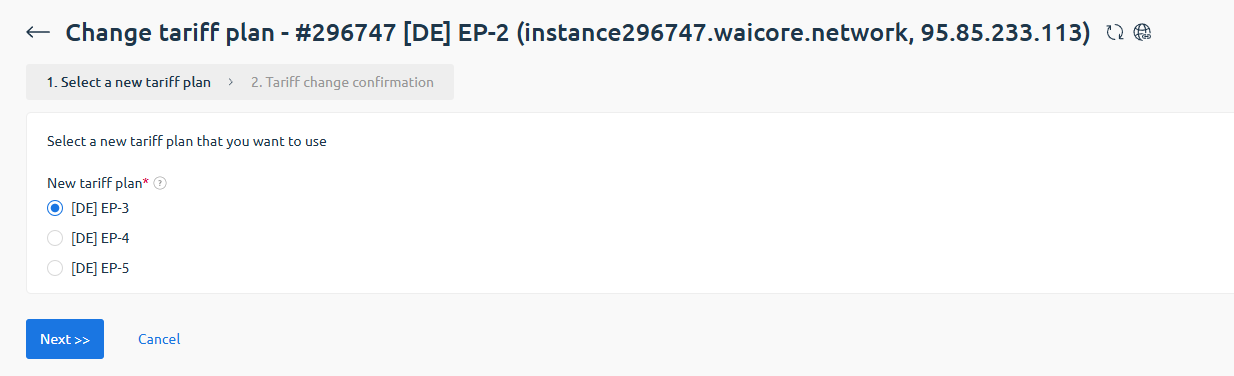
Step 2. Choose a new plan
Section titled “Step 2. Choose a new plan”Select the plan you want to switch to.
Example:
- EP-2
- EP-3
- EP-4
Click: Next >>
Step 3. Confirm the change
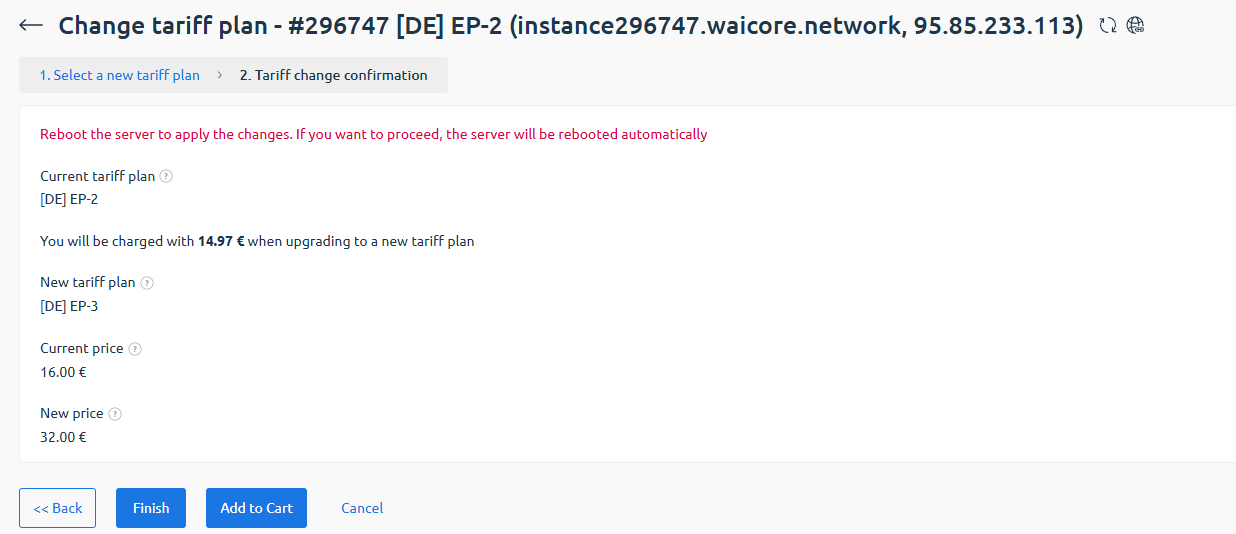
Section titled “Step 3. Confirm the change”Check:
- Current plan
- New plan
- Upgrade cost
- New monthly price
Click: Finish
Step 4. Wait for changes
Section titled “Step 4. Wait for changes”During the plan change, the server will automatically reboot.
After completion, the updated plan will appear in the services list.

Step 5. Verify new resources
Section titled “Step 5. Verify new resources”Open the server control panel.
The configuration section will display updated resources (CPU, RAM, disk).

🎉 Done! The server plan has been successfully changed.