

Changing the Server Password
If you need to change the server access password, you can do it via the control panel in just a few seconds.
Step 1. Open control panel
Section titled “Step 1. Open control panel”Go to: Virtual Dedicated Servers
Select the required server and click: Go to

Step 2. Open management menu
Section titled “Step 2. Open management menu”Click the three-dot menu.

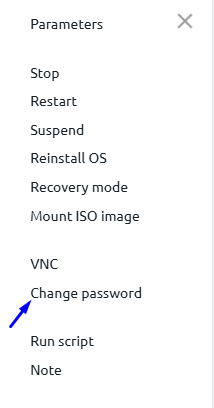
Step 3. Select “Change Password”
Section titled “Step 3. Select “Change Password””Click: Change Password
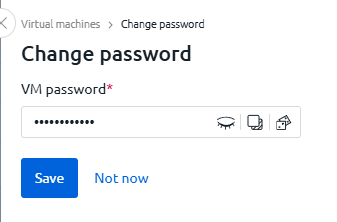
Step 4. Enter new password
Section titled “Step 4. Enter new password”Enter a new password and click: Save
Step 5. Confirm result
Section titled “Step 5. Confirm result”You will see a notification: Password has been successfully changed

🎉 Done! The server password has been successfully changed.