
How to repair Guest Agent
How to Check GA Functionality on a VM
Section titled “How to Check GA Functionality on a VM”- Connect to the VM via SSH
- Run:
systemctl status qemu-guest-agentactive (running)→ agent is runninginactive (dead)→ agent is stopped- Not found → agent is not installed
How to Restore GA Operation
Section titled “How to Restore GA Operation”If QEMU Guest Agent is Not Installed
Section titled “If QEMU Guest Agent is Not Installed”- Connect via SSH
- Install the package:
CentOS:
yum install qemu-guest-agentDebian / Ubuntu:
apt install qemu-guest-agent- Enable autostart:
systemctl enable --now qemu-guest-agent- Check status:
systemctl status qemu-guest-agent- Check SELinux:
sestatusIf SELinux is enabled:
-
Edit
/etc/selinux/config -
Change:
SELINUX=enforcingto:
SELINUX=disabled -
Reboot the VM
- Check file:
/etc/sysconfig/qemu-gaIf it contains:
BLACKLIST_RPC=guest-file-open,guest-file-close,guest-file-read,guest-file-write,guest-file-seek,guest-file-flush,guest-exec,guest-exec-status— remove or comment it, then restart GA:
systemctl restart qemu-guest-agentIf QEMU Guest Agent is Stopped
Section titled “If QEMU Guest Agent is Stopped”- Connect via SSH
- Start the service:
systemctl start qemu-guest-agentIf guest-exec is Disabled
Section titled “If guest-exec is Disabled”- Connect via SSH
- Run:
sed -i '/BLACKLIST_RPC=/cBLACKLIST_RPC=' /etc/sysconfig/qemu-ga- Restart GA:
systemctl restart qemu-guest-agentIf You Need GA on Windows
Section titled “If You Need GA on Windows”- Install Virtio drivers:
-
Windows Server 2012 R2: https://fedorapeople.org/groups/virt/virtio-win/direct-downloads/archive-virtio/virtio-win-0.1.189-1/virtio-win-0.1.189.iso
-
Windows Server 2008: https://fedorapeople.org/groups/virt/virtio-win/direct-downloads/archive-virtio/virtio-win-0.1.137-1/virtio-win-0.1.137.iso
-
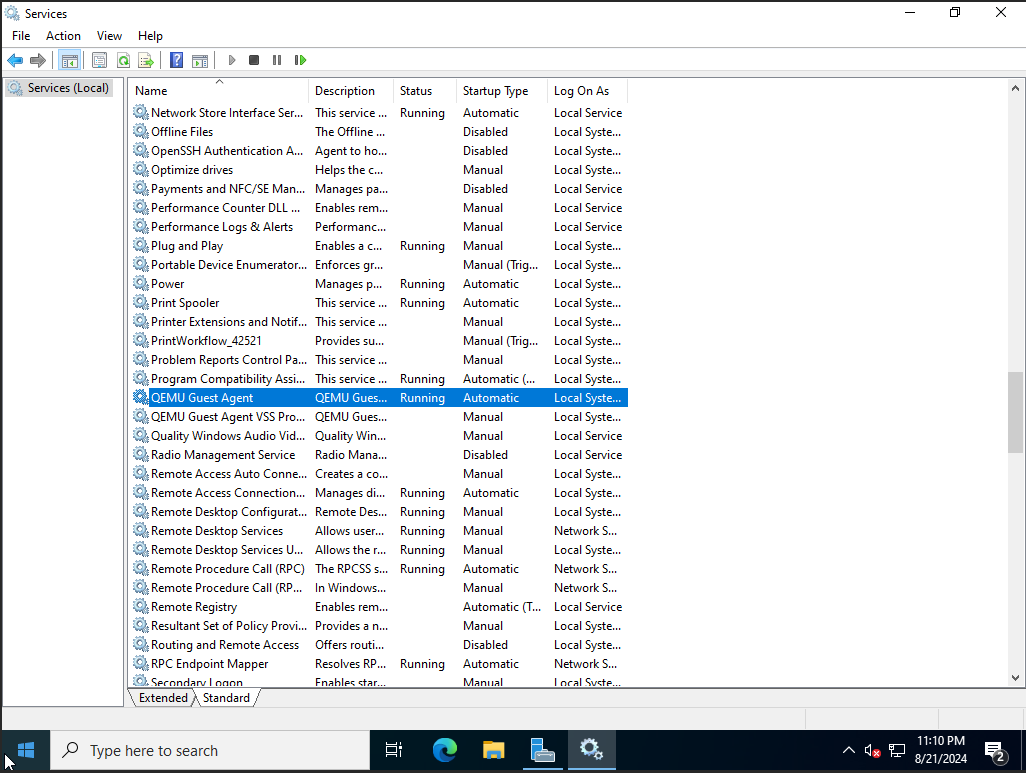
Install QEMU Guest Agent
-
Open
services.msc:
- Ensure the service is running
- Start it if stopped
- Install GA if missing