

Running Scripts on a Virtual Machine
In the control panel, you can run ready-made scripts for automatic installation of applications (for example, Django, LAMP, and others).
Step 1. Go to the control panel
Section titled “Step 1. Go to the control panel”Open: Virtual Dedicated Servers
Select the required server and click: Go to

Step 2. Open script launcher
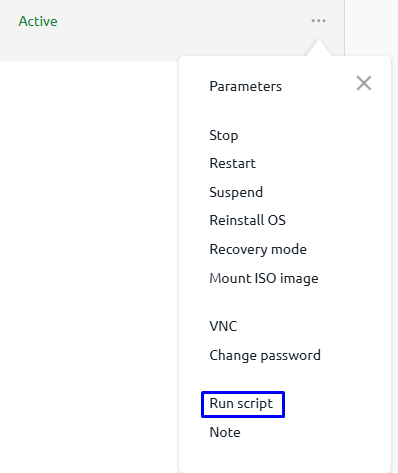
Section titled “Step 2. Open script launcher”Click the three-dot menu on the right.
Select: Run Script
Step 3. Select required scripts
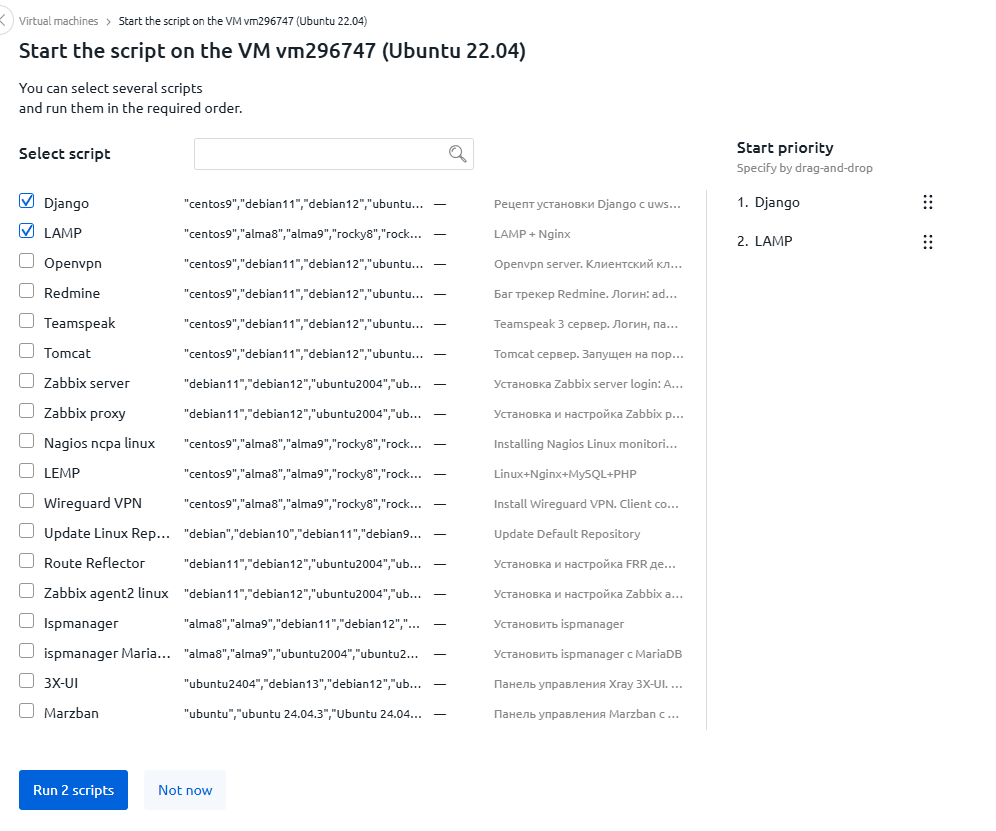
Section titled “Step 3. Select required scripts”Select the scripts you want to install.
For example:
- Django
- LAMP
- Zabbix
- ispmanager
You can select multiple scripts and change their execution order.
After selection click: Run
Step 4. Wait for execution
Section titled “Step 4. Wait for execution”After launch, the server status will change to: Script is running
Wait until the process completes.

🎉 Done! The selected scripts have been successfully executed on the server.